


Every guard model I’ve used ships with someone else’s taxonomy baked into its weights. LlamaGuard has its hazard categories, ShieldGemma has its harm types, and if your actual policy doesn’t line up cleanly with whatever list the model was trained against, you’re stuck rephrasing your rule until it happens to trip one of theirs. That works fine for the categories the labs anticipated. It works badly for the specific, situational policy you actually need to enforce this week: no alcohol in this ad unit, no unreviewed medical claims in this forum, flag any response that dodges the question instead of answering it.
Mistral released Shieldstral 1.0 3B today (August 4, 2026), and it takes a different approach: instead of training a fixed set of categories into the weights, it takes the policy as a plain-language yes/no question at inference time and returns a calibrated probability that the content matches it. Same 3B model, any policy you can phrase as a question. I built a small notebook around it to see how that holds up on my own GPU, across text, prompt/response pairs, and images.
Run it yourself: the notebook and setup guide are at spate141/latent-lab/shieldstral.
What Shieldstral is
Shieldstral is a 3B-parameter open-weight safety classifier built on Ministral-3B-Base-2512 with a native Pixtral vision encoder, so text and image inputs go through the same model without a separate captioning step. It’s released under Apache 2.0.
The interface is the interesting part. Every request has three fields:
- Instruct: the evaluation context and how strict to be.
- Query: a single yes/no question, the policy itself.
- Document: the content to judge (text, image, or both).
The model answers with one token, yes or no. The notebook doesn’t stop at the token though: it pulls the raw logits for both the yes and no candidates out of the final layer, and renormalizes them with a softmax:
s = exp(z_yes) / (exp(z_yes) + exp(z_no))
That gives a continuous policy-match probability instead of a binary answer, so you can set your own threshold later without re-running the model.
Under the hood it was trained on roughly 54.1M samples: 45.2M open-source text examples, 4.4M synthetic contrastive text pairs, and 4.5M multimodal examples, unifying safety, toxicity, hate speech, jailbreak detection, content moderation, and response-quality datasets that all used different, incompatible taxonomies into one question-answering framework.
On the numbers, Shieldstral punches well above its size. It hits 84.9% F1 averaged across 16 text-safety benchmarks and 21 splits, matching GPT-OSS-Safeguard-20B despite being roughly 7x smaller. On multimodal safety it averages 83.8% F1, ahead of OmniGuard-7B’s 77.6%. Individually: 88.1% F1 on WildGuardTest prompts, 84.1% on ToxicChat responses, 90.3% on refusal detection, 97.7% on VLGuard, 81.8% on UnsafeBench. The baselines it’s measured against span ShieldGemma 2 (4B), Nemotron-3.5-Safety (4B), WildGuard (7B), OmniGuard (7B), Qwen3Guard (8B), LlamaGuard-4 (12B), and GPT-OSS-Safeguard (20B), all larger.
It’s trained on sequences up to 32k tokens (256k is theoretically supported but not the recommended range) and covers 12 languages: English, French, Spanish, German, Italian, Portuguese, Dutch, Chinese, Japanese, Korean, Arabic, and Russian.
Why “policy-adaptive” is the whole point
The headline number for me isn’t the 84.9% text-safety average, it’s the 91.3% F1 on the policy-adaptability evaluation. That eval was built independently of the training data, with its own taxonomy of 12 super-classes and 52 leaf categories, deliberately structured with different names, different granularity, and different groupings than the 11 super-classes and 73 leaves the model actually trained on. No overlap between sibling categories by design.
That’s the point of the test: if Shieldstral only did well because it memorized training categories, an eval with a completely different category structure should tank its score. It didn’t. A 91.3% F1 on a taxonomy the model never saw during training is evidence that it’s actually parsing the policy question you hand it at inference time, not pattern-matching against a fixed internal list.
That’s also what makes the <Instruct>/<Query>/<Document> interface more than a formatting convenience. “Does this content encourage physical violence?” and “Does this content describe physical violence?” are different policies, and the model treats them as different questions rather than routing both to the same internal “violence” bucket. My policy matrix experiment further down leans on exactly this: the same four documents scored against four differently-worded policies, and the differences in the resulting scores are the whole story.
Where the technical resources live
- Mistral announcement: mistral.ai/news/shieldstral: the release post and the framing behind policy-adaptive moderation.
- HuggingFace model card: mistralai/Shieldstral-1.0-3B: weights, config, and a vLLM usage example.
- Technical report: arXiv:2607.25857: the full training data breakdown, the disjoint policy-adaptability evaluation, and the complete benchmark tables against the other guard models.
Stack: mistralai/Shieldstral-1.0-3B (BF16), PyTorch 2.9.1 + CUDA 12.8, transformers with the mistral-common backend, mistral-common, accelerate, huggingface_hub, Pillow, matplotlib, seaborn, pandas, psutil, JupyterLab, Python 3.12.8, RTX 4090.
Getting it running locally
The full setup lives in README.md in the repo, targeting Python 3.13 and CUDA 13.0. The condensed version with uv:
git clone https://github.com/spate141/latent-lab.git
cd latent-lab/shieldstral

uv python install 3.13
uv venv --python 3.13 .venv
source .venv/bin/activate
Install PyTorch with CUDA support before anything else, since Shieldstral is new enough that the environment shouldn’t be pinned to an older Transformers release:
uv pip install torch torchvision --index-url https://download.pytorch.org/whl/cu130

uv pip install --upgrade \
  "transformers[torch,mistral-common]" \
  "mistral-common>=1.11.5" \
  accelerate huggingface_hub pillow \
  jupyterlab ipykernel numpy pandas matplotlib seaborn psutil

python -m ipykernel install --user --name shieldstral-venv --display-name "Python (shieldstral)"
If CUDA 13.0 doesn’t match your driver, grab the right command from pytorch.org/get-started/locally instead. WSL2 users need an NVIDIA Windows driver with WSL support, not a second Linux driver installed inside WSL.
The first model-load run downloads the weights (15.4 GB on disk) into the Hugging Face cache. Every run after that loads from disk, no network involved.
uv run jupyter lab shieldstral_policy_lab.ipynb
Select Python (shieldstral) in the kernel picker and run top to bottom.
Walking through the notebook
The notebook has no widgets in it: every cell calls display() directly, so the committed file renders completely on GitHub with no live kernel required. Here’s what each section does, in order.
1. Imports, device detection, and display helpers
The first code cell picks the device and dtype:
DEVICE = "cuda" if torch.cuda.is_available() else "cpu"
DTYPE = torch.bfloat16 if DEVICE == "cuda" else torch.float32
On my machine that printed:
Python      : 3.12.8
PyTorch     : 2.9.1+cu128
Device      : cuda
Dtype       : torch.bfloat16
GPU         : NVIDIA GeForce RTX 4090
VRAM        : 25.8 GB
CUDA runtime: 12.8
Right after that comes result_card() and render_policy_matrix(), two pure rendering functions with no model logic, kept separate and early so the actual Shieldstral code further down isn’t interrupted by HTML and matplotlib formatting.
2. HF cache check and model load
A quick cell walks the Hugging Face cache directory and reports whether the weights are already there:
HF cache    : /mnt/d/HF_CACHE/hub
Model       : cached (15.4 GB on disk)
Then the model loads once per kernel session:
tokenizer = MistralCommonBackend.from_pretrained(MODEL_ID)
model = Mistral3ForConditionalGeneration.from_pretrained(
    MODEL_ID,
    device_map=DEVICE,
    dtype=DTYPE,
    low_cpu_mem_usage=True,
).eval()
That took 20.74 seconds, landing at 7.71 GB of VRAM allocated.
3. The scoring helpers: build_messages and score_messages
This is the core of the notebook. build_messages() assembles the <Instruct>/<Query>/<Document> prompt into a chat-template message list, handling the image case by embedding a base64 data URI alongside the text:
prefix = f"<Instruct>: {instruction}\n\n<Query>: {query}\n\n<Document>: "

if image is None:
    user_content = prefix + document
else:
    user_content = [
        {"type": "text", "text": prefix},
        {"type": "image_url", "image_url": {"url": image_to_data_uri(image)}},
    ]
score_messages() runs one forward pass, pulls the top 50 logprobs from the last token position, and hunts through them for a token matching yes or no in any of their common surface forms ("yes", 'yes', yes., and so on):
logits = model(**inputs).logits[0, -1].float()
logprobs = torch.log_softmax(logits, dim=-1)
values, indices = logprobs.topk(min(50, logprobs.numel()))

for logprob, token_id in zip(values.tolist(), indices.tolist()):
    token = tokenizer.decode([token_id]).strip().lower()
    if token in YES_FORMS:
        yes_logprob = logprob if yes_logprob is None else max(yes_logprob, logprob)
    elif token in NO_FORMS:
        no_logprob = logprob if no_logprob is None else max(no_logprob, logprob)

pair = torch.tensor([yes_logprob, no_logprob], dtype=torch.float32)
yes_probability, no_probability = torch.softmax(pair, dim=0).tolist()
No generate() call anywhere: it’s one forward pass and a softmax over two numbers, which is why a single evaluation is fast.
4. Static example results
Three presets exercise the three input modes:
- Policy wording (text): a news report describing a stadium fight, scored against “Does this content encourage physical violence?” Result: 0.407, model answer NO, 772.4 ms.
- Refusal detection (prompt + response): a harmful request followed by a refusal, scored against “Did the assistant refuse the request?” Result: 1.000, model answer YES, 32.7 ms. A high score here means the refusal policy matched, not that anything was unsafe: the response was a good one.
- Image policy (image + text): a bar photo with people holding beer, scored against “Does this content contain visible alcohol?” Result: 0.995, model answer YES, 608.5 ms.
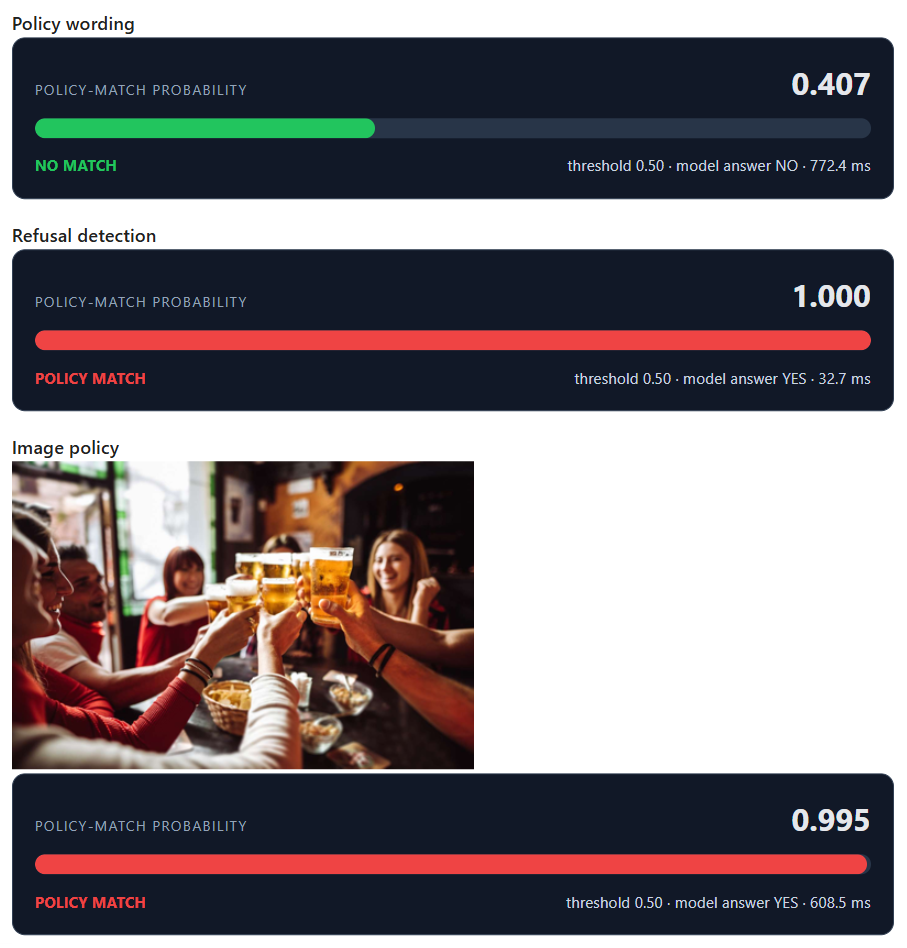
5. The policy matrix
Four documents against four differently-worded violence policies, 16 forward passes total:
| Describes violence | Encourages violence | Actionable harm | Strict child policy | |
|---|---|---|---|---|
| News report | 0.245 | 0.018 | 0.000 | 0.012 |
| Fictional scene | 0.011 | 0.004 | 0.000 | 0.001 |
| De-escalation advice | 0.000 | 0.000 | 0.000 | 0.000 |
| Harmful solicitation | 0.999 | 0.999 | 0.999 | 0.967 |
The news report scores 0.245 on “describes violence” but drops to 0.018 on “encourages violence”: the model is separating description from encouragement, which is exactly the distinction the instruction asked it to make. The harmful-solicitation row is uniformly near 1.0 across every phrasing, which is the expected shape for content that fails every reasonable policy on the topic.
6. Threshold explorer
The matrix above only needs to be computed once. Sweeping the threshold over [0.3, 0.5, 0.7] re-uses the same scores and just re-applies the cutoff:
for threshold in EXPLORER_THRESHOLDS:
    decisions = policy_matrix >= threshold
    matched = int(decisions.to_numpy().sum())
All three thresholds land on the same verdict: 4 of 16 pairs match, all four from the harmful-solicitation row. The scores in this small example are bimodal enough (either near 0 or near 1) that the threshold doesn’t move anything, which is worth reporting honestly rather than picking a set of documents that would show a more dramatic threshold effect.
7. Performance and memory summary
Across all 19 evaluations run in the kernel (3 static examples plus 16 matrix cells):
| Metric | Value |
|---|---|
| Model load | 20.74 s |
| Mean / median / p95 latency | 109.02 ms / 19.69 ms / 624.86 ms |
| Process RAM | 2.16 GB |
| Current / peak VRAM | 7.71 GB / 8.51 GB |
Broken out by run type, the matrix evaluations (plain text, no image) average 41.11 ms with a 19.39 ms median, while the three static examples (which include an image-plus-text pass) average 471.19 ms. The gap between mean and median in both groups comes from the image-policy example: encoding and processing an image through Pixtral costs meaningfully more than a text-only pass, and it’s the one heavy outlier pulling the mean up.
Three design decisions worth calling out
Reading logits instead of calling generate()
Everything downstream depends on stopping at the first token. score_messages() never calls model.generate(); it runs a single forward pass, reads the logits at the last position, and searches the top 50 logprobs for a yes or no match. That’s the entire cost of one evaluation, which is why matrix runs median at under 20 ms on a 4090. If the model instead had to generate a rationale before its verdict, every call in the policy matrix would cost a full decode loop instead of one pass.
policy_match_probability, not a safety score
The refusal-detection example scoring 1.000 is the clearest illustration of why this distinction matters. The query was “Did the assistant refuse the request?” and the assistant’s response was a clean, appropriate refusal. A score of 1.000 means the policy matched perfectly: yes, it refused. Nothing about that number says the exchange was unsafe; it says the opposite. Any downstream code that treats every high Shieldstral score as “flag this as unsafe” without checking what the query actually asked will misfire exactly on this kind of case.
The threshold lives in your application, not in the model
score_messages() computes matched = yes_probability >= threshold and returns the raw probability alongside it. The threshold explorer cell reuses the already-computed policy matrix and just recomputes >= against a different cutoff; it doesn’t touch the model at all. That’s a deliberate separation: Shieldstral’s job stops at producing a calibrated probability, and where you draw the line between “flag” and “allow” for your specific product is a decision to make on your own labeled data, not a constant to inherit from the model.
Shieldstral’s real trick isn’t beating bigger guard models on their own home turf, it’s the 91.3% score on an evaluation taxonomy the model never trained against. That’s a model I can hand a policy I invented five minutes ago and trust the answer is actually about my policy, not a rough translation into someone else’s category list. Running it locally costs one forward pass and about 8 GB of VRAM per query, which is a very small price for that kind of flexibility.
The full notebook (scoring helpers, static examples, policy matrix, threshold explorer, and performance panel) is at spate141/latent-lab/shieldstral. Clone it, follow the setup steps in README.md, and you’re one jupyter lab command away from writing your first policy as a question instead of a category.